
Version History for AI Agent Knowledge ⏰
1770626123813
Track every change to your AI Agent's knowledge and restore previous versions with confidence.
What's new
We've added Version History to Guidances and Help Center Articles in the Knowledge Hub. Now you can see exactly what changed, when it changed, and who made the change — plus restore any previous version if needed.
Key features
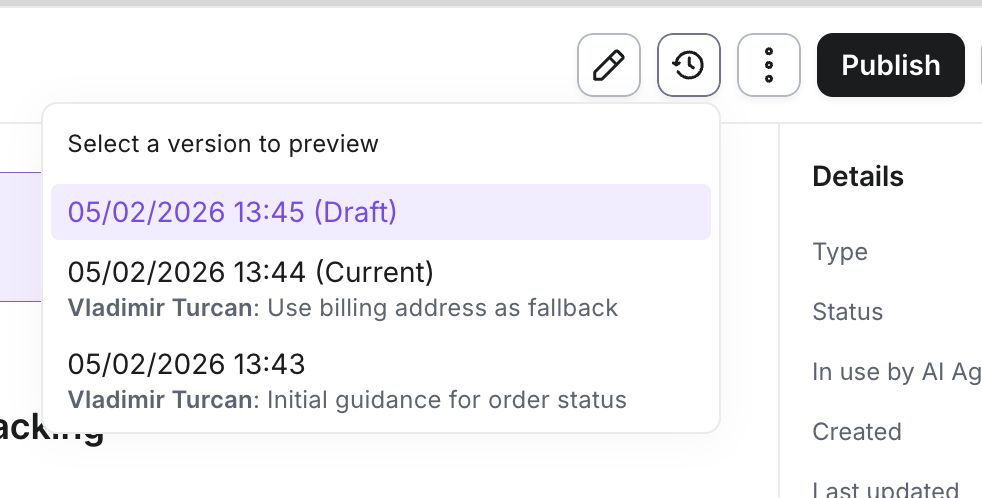
Full change history: View all published versions of your guidances and articles with timestamps, publisher names, and change summaries
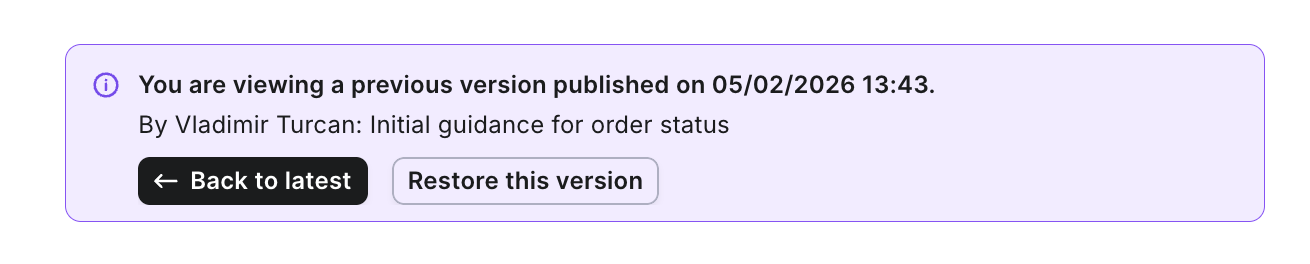
Preview before restoring: Click any version to preview its content side-by-side with your current version — no commitment required
One-click restore: Bring back any previous version instantly. Restoring creates a new draft, so your current published version stays safe until you're ready
Performance metrics by version: See how each version performed during its active period, so you can understand the impact of your changes
Why it matters
Content evolves, and sometimes changes don't work out as expected. With Version History, you can:
Debug with confidence — If your AI Agent starts giving unexpected responses, quickly compare recent versions to identify what changed
Iterate safely — Test new approaches knowing you can always roll back
Collaborate better — See who published each version and what they changed, making team handoffs smoother
Measure impact — Understand which version of your content drove better results
How to use it
1. Open any Guidance or Article in the Knowledge Editor
2. Click the history icon in the toolbar
3. Browse your version history and click any version to preview
4. Use "Restore this version" to create a new draft from any historical version
Did you like this update?


Leave your name and email so that we can reply to you (both fields are optional):
