
🔗 Reference skills, guidance, and Help Center articles inside your skills
1791274245554
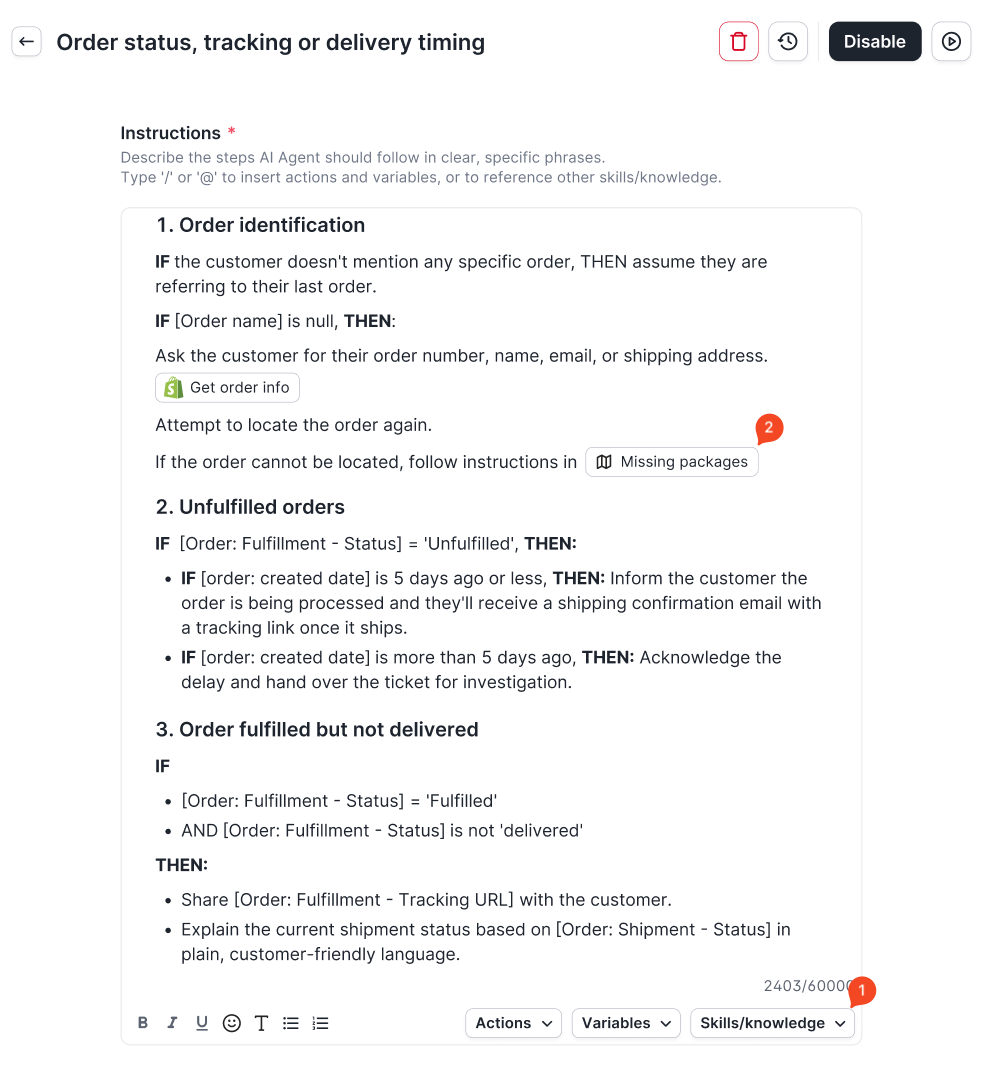
You can now reference another skill, guidance, or Help Center article from inside any skill or guidance. AI Agent pulls in that content when it reaches that step, so you write each process once and reuse it everywhere.
Why it matters
More control over the knowledge AI Agent uses. Writing "follow our refund policy" as plain text never guaranteed AI Agent would find the right source. With a reference, you tell AI Agent exactly which skill, guidance, or article to use at each step.
No more duplicated instructions. A shared process like refunds used to be copied into every skill that needed it (order cancellation, subscription cancellation, damaged items) and kept in sync by hand. Now you write it once and reference it wherever it applies. When you update the source, every skill that points to it stays current.
How to access
Go to AI Agent, open a skill or guidance, and insert a reference with the “@” shortcut key or by clicking “Skills/knowledge” on the text editor. Search for the resource by name and select it. Only published, enabled resources can be referenced.
You can also ask Gaia to add references for you when it creates or edits your skills and guidance.
Did you like this update?


Leave your name and email so that we can reply to you (both fields are optional):
