
OAuth2 Authentication for HTTP Integrations
1774273631215
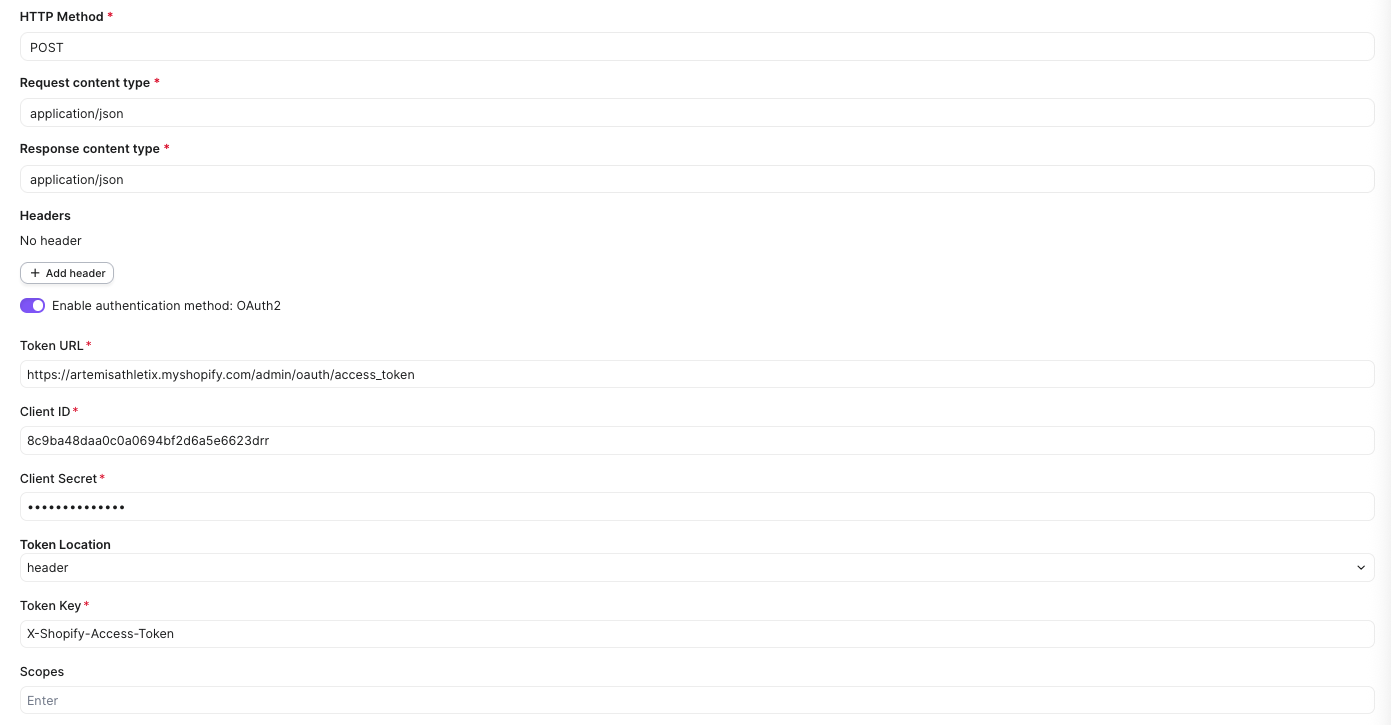
HTTP integrations now support OAuth2 (Client Credentials). Tokens are obtained and refreshed automatically so your integrations never break.
Why this matters for Shopify users
Shopify is moving to OAuth2 and has been deprecating static API keys. If you use HTTP integrations to call the Shopify API, you can now authenticate natively:
Open your HTTP integration in Settings → Integrations → HTTP
Enable "Authentication method: OAuth2"
Enter your Shopify app credentials:
Token URL:
https://{your-store}.myshopify.com/admin/oauth/access_tokenClient ID and Client Secret from your Shopify custom app
Token Key:
X-Shopify-Access-Token
Save — done. No more copying and pasting static tokens.
What you get
Works on all HTTP integrations — enable OAuth2 on any new or existing integration
Simple setup — toggle it on, enter your credentials, save
Automatic token refresh — no more integrations silently breaking when tokens expire
Works with any OAuth2-compatible API
This works with any third-party API that supports OAuth2 Client Credentials authentication.
Did you like this update?


Leave your name and email so that we can reply to you (both fields are optional):
