
Introducing Voice SLAs: Measure Your Team's Call Performance with Confidence
1771239169919
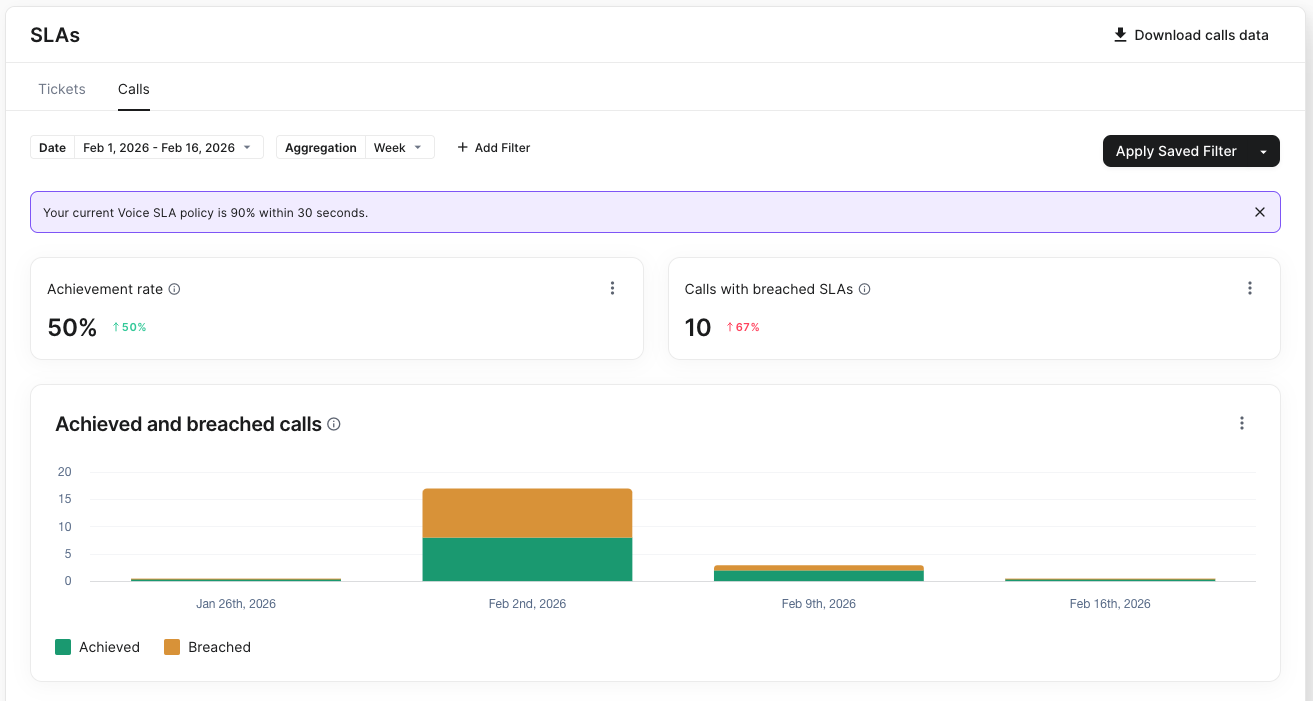
Keeping customers from waiting too long on the phone is key to great support.
We’re introducing Voice SLAs, a simple way to track how quickly your team answers calls and keep service levels on target.
🎯 What is Voice SLA?
Voice SLA lets you set a clear goal for phone support: the percentage of calls answered within a specific time (for example, 80% within 30 seconds).
Once set up, Gorgias automatically tracks every eligible inbound call against your goal, so you always know if you’re meeting expectations.
✅ Eligible calls: inbound calls received during business hours, excluding cancelled calls and callbacks.
📊 Why it matters
Monitor performance at a glance – Track achievement rates over any period and spot issues early.
Optimize staffing – Identify patterns in breached SLAs to adjust coverage.
Industry-standard measurement – Wait time starts when a caller enters the queue.
Accurate historical reporting – SLA updates don’t retroactively change past measurements.
🚀 How to get started
1️⃣ Set up your Voice SLA
Go to Settings → SLA, create a new policy, select Voice, and choose your target percentage and time threshold.
We default to 90% within 1 minute to help you get started quickly.
2️⃣ Track performance across dashboards
Voice SLA appears in:
📈 SLA Dashboard (Analytics → SLA → Calls tab)
🔴 Live Voice Dashboard
📞 Voice Overview Dashboard (SLA Status: Achieved, Breached, or N/A)
Did you like this update?


Leave your name and email so that we can reply to you (both fields are optional):
