
Compare versions for guidance and help center articles
1771920791021
Track exactly what changed in your content before you publish or restore.
What’s new
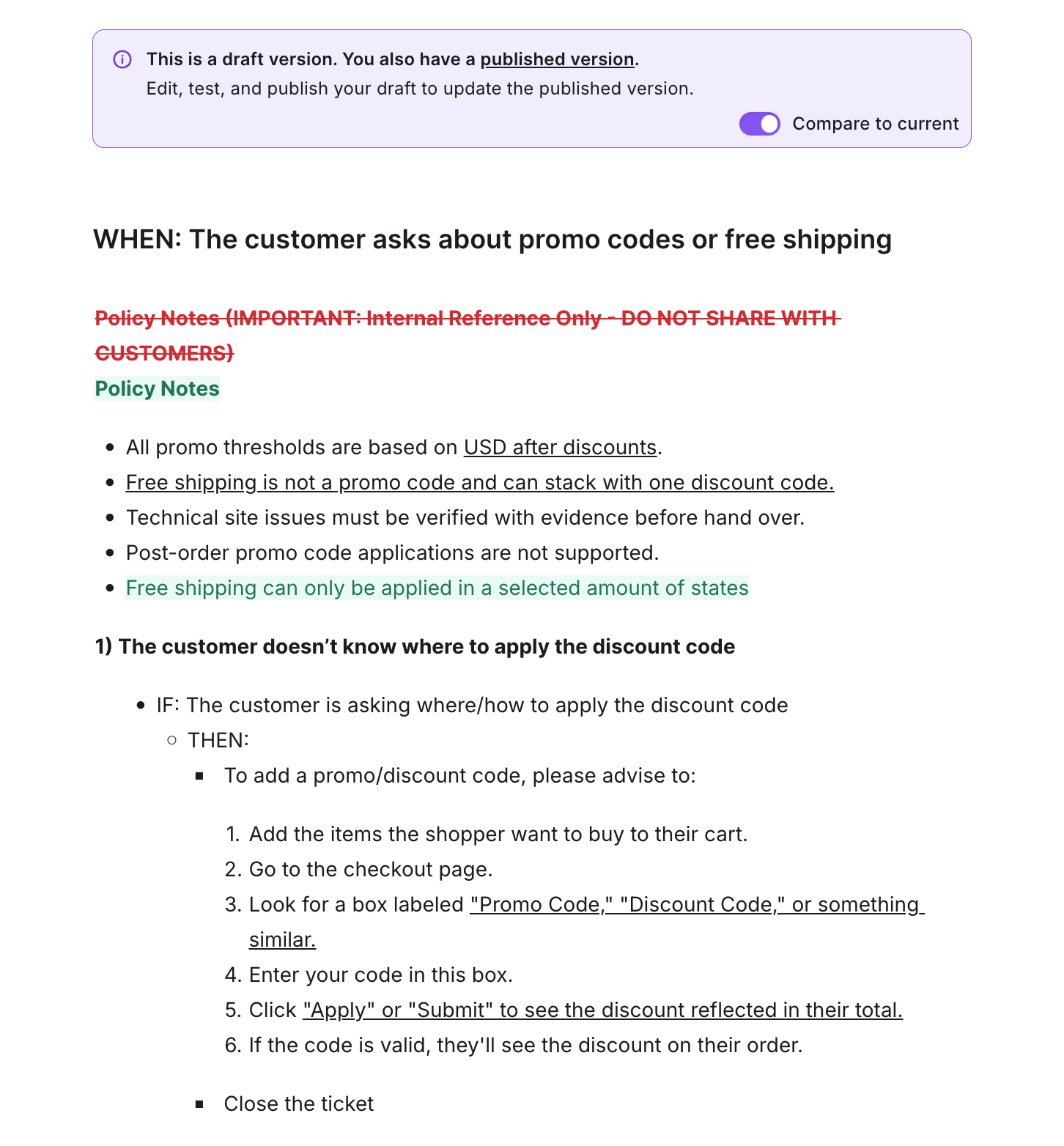
We’ve added the ability to compare versions for Guidances and Help Center Articles in the Knowledge Hub. You can now compare:
Draft vs latest published version before publishing updates
Older version vs latest published version before restoring from history
Key features
Draft-to-published comparison: See additions, deletions, and edits inline so you can review changes before going live
Historical-to-current comparison: From version history, compare any previous version against the latest published content
Quick compare toggle: Turn on Compare to current directly in the editor for an instant side-by-side review
Safer publishing and restoring: Validate content changes before publishing a draft or restoring an older version
Why it matters
Content updates are easier to review when differences are visible right away. With this feature, you can:
Catch mistakes before publishing
Restore with confidence by validating older content against what is live now
Reduce back-and-forth during reviews
Keep your AI Agent responses consistent and accurate
How to use it
Open any Guidance or Help Center Article in the Knowledge Editor
For drafts, enable Compare to current to view differences from the published version
For older versions, open version history and select a version
Did you like this update?


Leave your name and email so that we can reply to you (both fields are optional):
